 JFBackup
Architecture & security
How the parts of JFBackup talk to each other, what happens to your data on its way into the repository, who holds which key and what JFBackup does when something goes wrong. Written for admins, from the app's own documentation and source.
Four programs
Console · server · agent · bcctl, each for Windows and Linux
JFBackup is not one program but four. The server does the work; the console and bcctl only talk to it; agents give it access to the machines it protects. Server and agent run as a Windows service or a systemd unit and log to standard output and to log files of 10 MB, keeping five older ones.
| Program | What it does |
|---|---|
| Consolethe desktop app | Overview, jobs, restore, servers and agents, repositories, credentials, monitoring, settings and the wizards. Its setup assistant sets up a server, connects to one or turns the computer into an agent. |
| Serverbc-server, port 7642 | The REST API, the scheduler (every 15 seconds: due jobs, expired tokens, old operations), the backup and restore engine, repositories, users, roles, the audit log and its own certificate authority. Long actions run as operations, at most eight at once, and can be cancelled. |
| Agentbc-agent, port 7680 | Shares folders of one machine with one server over mutual TLS and reports every 30 seconds. |
| bcctlthe command-line client | Everything scripts need: setup, login, status, run, wait, restore, verify, logs, audit, updates and release signing. It reads tapes without a server. |
The server's data folder
Everything the server knows lives in one folder. A server that was set up does not start without its keys: it could not read its own secrets or prove its restore points.
- data/
- db/the datastore: snapshot and write-ahead journal, crash-safe
- journal/audit and session logs
- keys/master, signing and recovery keys
- pki/CA, server and client certificates, their keys sealed
- logs/10 MB per file, five older files kept
- config_backups/encrypted configuration backups
- setup.tokenonly until the first administrator exists
Connections
HTTP/1.1 and JSON · TLS 1.3 · its own certificate authority · pinned certificates
The server brings its own certificate authority (Ed25519, valid for ten years). It issues the server's TLS certificate for the machine's names and addresses, renewed when they change or 30 days before it expires, a client certificate that the server shows to agents, and one certificate per agent, valid for a year. On the first connection the console and bcctl show the CA's SHA-256 fingerprint and keep it once you trust it.
- Consolebearer token, 24 h
- bcctlbearer token, 24 h
- API certificate from its CA
- Client certificate towards agents
- Agent certificates, pinned
- Own certificateissued at pairing, one year
- Heartbeatevery 30 seconds
- Folders of the serverlocal disks or a NAS mount
| From, to | How | Trust |
|---|---|---|
| Console, bcctl to the server | HTTP/1.1 with JSON and a bearer token; TLS 1.3 on the network, plain HTTP only on loopback | The server's CA, confirmed by its fingerprint or given as a file |
| Server to agent | Mutual TLS on port 7680, one kept-alive session per agent | The server shows its client certificate and accepts exactly the agent certificate it issued |
| Agent to server | A heartbeat every 30 seconds: last seen, address, shared folders | The agent's own certificate |
| Central server to other servers | Their report once a minute | A fleet token per server, its CA pinned by fingerprint |
| Server to mail and web hooks | SMTP with STARTTLS or TLS, never a password in clear; JSON over HTTPS | The system's certificate authorities, plus a company CA if you add one |
Pairing agents
A one-time code on Windows and Linux · an SSH push on Linux
An agent belongs to exactly one server. It joins with a one-time code or is installed by the server itself over SSH. Either way it ends up with its own key, a certificate from the server's CA, and a server it checks by fingerprint.
With a pairing code
- Install the agentwith the setup on Windows or the .deb package on Linux.
- Create a code in the consolevalid for 15 minutes and usable once, shown with the server's address and the fingerprint of its CA.
- Pair on the machine
bc-agent pairreads the CA from the TLS handshake and compares its fingerprint, or asks you to. - Get a certificateThe agent makes a new Ed25519 key and enrols with the code; the server's CA issues its certificate. From then on: mutual TLS.
bc-agent service install runs it as a Windows service or a systemd unit, or pair … --service does both at once.
Over SSH
- Enter the addressThe console shows the machine's SSH host key to compare before anything is sent.
- Choose the loginstored credentials, a password or an Ed25519 key, or a password typed once.
- Upload and pairThe server uploads the agent, pairs it with a fresh one-time code and passes its CA fingerprint along, so the agent checks this server.
- StartAs root, a systemd service; otherwise a background process of that user. A second push updates the program and keeps the pairing.
For Linux computers with OpenSSH on x86-64. Windows machines pair with a code.
From a file to a restore point
FastCDC · keyed BLAKE3 · LZ4 or zstd · XChaCha20-Poly1305 · Ed25519
The engine walks the job's sources on the server or through an agent. A file with the same size, modification time and file id as in the previous restore point takes over its chunks without being read; an "active full" reads everything again. Every restore point is still a full image: "incremental" only means that unchanged files cost nothing.
What happens to new data
- Cut by contentFastCDC with normalized chunking. Boundaries depend only on the content, so an insertion early in a file moves one boundary and the later chunks stay deduplicated. The gear table comes from the repository key: chunk sizes do not reveal known files.
- Named by a keyed hashA chunk's id is the keyed BLAKE3 hash of its content. Identical data is stored once, and without the key the ids reveal nothing.
- Compressed, then encryptedLZ4 or zstd (level 3, or 6 for "High"), only when that saves something; then XChaCha20-Poly1305 with a fresh 24-byte nonce, the chunk's id, kind and codec authenticated with it.
- Packed with an indexSealed chunks go into pack files with a sealed index. The end of each pack repeats its index, so a lost index file can be rebuilt.
- TreesFolders become tree chunks. An unchanged folder produces the same tree chunk and is stored once.
- A signed snapshotThe restore point names its roots, is signed with the server's Ed25519 key and encrypted.
- Committed in orderPacks, synced; then indexes, synced; then the snapshot by an atomic rename. A crash leaves at most packs nobody refers to, which clean-up removes. Then the retention runs.
The repository
Format bcrepo-1 · check · clean-up · immutability
A repository is a folder of the server, on a local disk or a mounted NAS, and one process holds it at a time. Retention keeps restore points by number and by grandfather-father-son. Immutability is set per repository in days and can only be made longer; while it lasts, deleting a restore point is refused.
- repository/
- repo.jsonthe repository key, wrapped three times
- data/xx/<pack>.packsealed chunks, the index repeated at the end
- index/<pack>.idxthe sealed index of each pack
- snapshots/<id>.snaprestore points, signed and encrypted
- LOCKone process at a time
- Verify a restore point: every chunk is read, decrypted and compared with its id.
- Check a repository: snapshots, signatures, references and every blob.
- Clean up: mark and sweep, repacking packs that became sparse.
- Copies to a second repository rebuild every tree there, because chunk ids are keyed per repository; a map of copied trees keeps later copies incremental.
Keys and the recovery kit
One random key per repository, wrapped three times
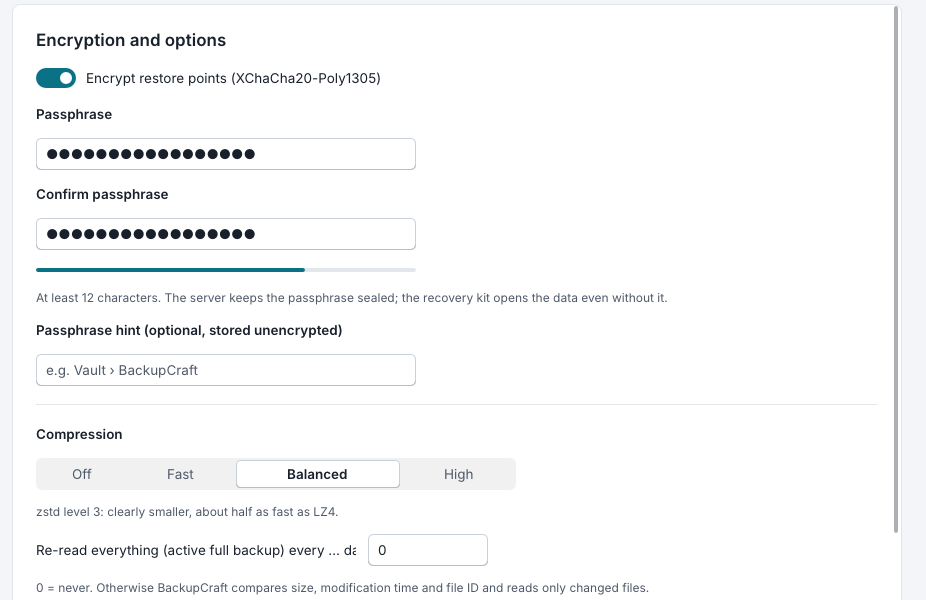
Every repository has one random key. It is never stored in the clear: repo.json holds it wrapped for the server's master key, for the passphrases of encrypted jobs and for the recovery kit. The keys for chunk ids, data, indexes, snapshots and the gear table are derived from it.
The master key also seals the secrets in the server's database, credentials and job passphrases, which the API never returns, and the key of the CA. A separate signing key signs the restore points. The recovery kit is for the day the server is gone: the server keeps only its public key and seals every repository key to it, while the private key opens every encrypted backup, and encrypted tapes too, without this server. Keep it offline and separate.
A configuration backup holds the database, without tokens and failed logins, and the keys in one file, encrypted with a passphrase (Argon2id and XChaCha20-Poly1305). Restoring it takes effect at the next start.
Users, roles and the audit log
Argon2id · tokens kept as a digest · four roles · every change logged
Nobody signs up: the first administrator is created with the server's one-time setup token, every other account by an administrator. Passwords have at least 12 characters and are stored with Argon2id. A login gives a token valid for 24 hours, of which the server keeps only the BLAKE3 digest. Too many failed logins within a minute lock the user name, and the count survives a restart.
| Role | May |
|---|---|
| Viewer | see the overview, jobs, restore points, sessions and their logs, hosts and repositories; change their own password |
| Restore | also browse restore points and restore files, but only into allowed folders, never to the original place and never replacing a file |
| Operator | also create, change, start, enable and disable jobs, verify restore points, cancel operations, check hosts and repositories, and restore to the original place, replacing files |
| Administrator | also delete jobs and restore points (never immutable ones); pair, install and remove agents; manage repositories, credentials, users and settings; read the audit log; create the recovery kit and configuration backups |
Every change gets an entry in the audit log, also those made by agents. bcctl docs lists every route of the API with the role it needs; the server routes by that same table.
What an agent may do
Shared folders only · no links · no commands
An agent is built to be harmless even if the server were not. It never runs commands, and the rules below hold on the agent itself, not only in the server.
- It reads only inside its backup folders and writes only inside its backup and restore folders.
- It never follows a symbolic link below them, for reading, listing folders or restoring.
- It writes restored files to temporary files it names itself and renames them when they are complete.
- Its port accepts only the server's client certificate, issued by the CA it paired with. Removing the host revokes the agent's own certificate.
bc-agent roots --add DIR --restore-add DIRchanges the shared folders on the machine, and--lockforbids the server to change them.
Restores follow the same care everywhere: every name from a restore point is checked (no separators, no "..", no drive), a link planted in the target stops that entry instead of redirecting it, and existing files are skipped, renamed or, for operators, replaced.
Signed updates
An Ed25519-signed manifest · SHA-256 per package · installed by an admin
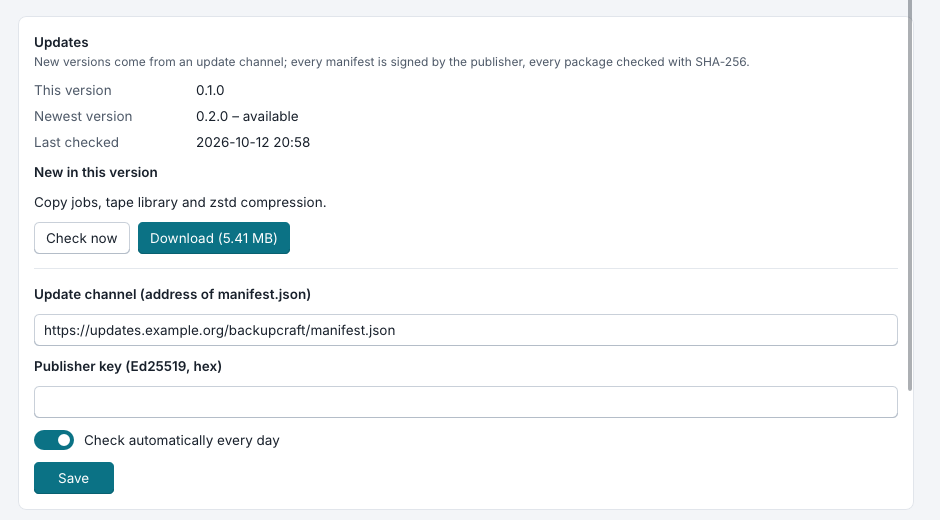
New versions come from an update channel. The channel may be HTTPS or plain HTTP: the signature and the digest protect the content either way.
- The publisher signs
bcctl release keygenmakes a publisher key;bcctl release manifestwrites the manifest and its signature for the packages of a release, without a server. - The server checksby hand or once a day: it fetches the manifest and its signature and checks it against the official release keys or the key in the setting
update.key. - The server downloadsthe package for its own platform, Windows or Linux on x86-64; size and SHA-256 must match the manifest.
- An administrator installsThe console shows the new version; the setup or the package manager installs it and restarts the service.
When something fails
What JFBackup does, case by case
| If | then |
|---|---|
| the server stops in the middle of a backup | its datastore is crash-safe (snapshot and write-ahead journal), the commit order leaves at most unreferenced packs, and sessions and operations that were running are marked interrupted at the next start. |
| a protected machine fails | a replica, kept up to date after every new restore point, takes over (failover). Failback backs up the replica's folders as a point of the job and writes them back to the original places without deleting anything there; undo drops the failover. Failover plans switch several replicas in order, with a pause between them. |
| a file was deleted or overwritten | any restore point brings it back, to its place or into another folder. |
| a backup was damaged or changed | verify and check notice it: every chunk is authenticated and compared with its id, every restore point's signature is checked. |
| an index file is lost | it is rebuilt from the end of its pack. |
| the backup server itself is lost | a configuration backup brings its database and keys to a new server; the recovery kit or the job's passphrase open the repositories without it; tapes are read with bcctl tape extract without any server. |
| a virtual machine's backup would not start | boot checks find out before you need it. |
| a machine with an agent is stolen | remove the host: its certificate is revoked. |
| someone tries to delete backups | immutable restore points cannot be deleted while the lock lasts, and the lock can only be made longer. |
Known limits
What JFBackup does not do yet, as its README lists it
- Virtual machines, instant start, boot checks and volume backups run on the backup server itself (a Linux server with QEMU/KVM for virtual machines), not on agents. Hyper-V is not supported.
- Backups of running virtual machines are crash-consistent: no agent in the guest quiesces its file systems.
- Volume backups need administrator (VSS) or root (LVM) rights, read the whole volume each time (deduplication keeps the storage small) and are restored as an image file.
- Tapes are virtual, files on disk; real tape drives are not driven.
- TLS to public servers does no revocation checks (CRL or OCSP).
- Agent certificates are valid for a year; renewing one means pairing again for now.
- The SSH push installs on Linux x86-64 only.
- No official release keys are built in yet: a server trusts update manifests only with the setting
update.key. - Failback writes the replica's state back but deletes nothing at the original.